Quick answer
p=none is a monitor-only policy. It collects aggregate reports and does nothing else; receivers still accept or reject the mail based on their own rules, not yours. To stop spoofed mail using your domain's From address, you need p=quarantine or p=reject. The safe way to get there is to read your aggregate reports first, fix every legitimate sender that is not producing aligned authentication, then advance the policy in stages.
What p=none does and what it does not
Many domains publish a DMARC record, check the "DMARC configured" box, and move on. The record exists, so the assumption is that spoofing is blocked. That assumption is wrong when the policy is p=none.
RFC 7489 defines three values for the p= tag. p=none tells receivers to take no DMARC-driven action on failing mail. Receivers report what they saw through aggregate reports sent to your rua= address, but they do not quarantine or reject based on your policy. A fraudster sending phishing mail from a spoofed version of your domain today gets through just as freely as before you published the record.
p=quarantine tells receivers to treat failing mail as suspicious, typically routing it to the spam or junk folder. p=reject tells receivers to refuse the message entirely at SMTP time, before it is ever placed in any folder. Those two values enforce. p=none observes.
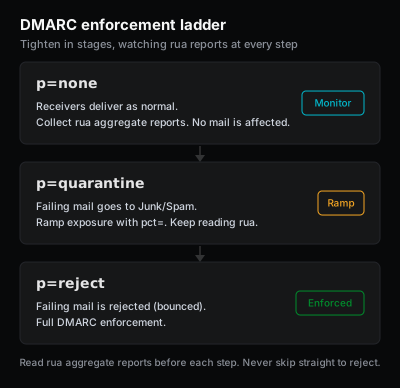
That distinction matters for how you think about your current setup. p=none is a useful starting state because it produces the reporting data you need before you can safely enforce, but it is a starting point, not a destination.
Why jumping straight to p=reject causes silent breakage
The risk of advancing directly to p=reject without reading your reports is that you are likely to block legitimate mail you did not know about. The usual casualty is a legitimate third-party sender that is not yet aligned for your domain.
Most domains send through more than one system. Marketing campaigns leave through an email service provider, transactional notifications leave through a delivery platform, and IT or HR systems send through their own integrations. Each of those systems needs to authenticate as your domain, either by signing messages with DKIM under your domain, or by sending from an envelope-sender that aligns with your From domain via SPF.
If any of those systems is not producing aligned authentication and you advance to p=reject, receivers start refusing that mail immediately. Recipients see nothing. There is no bounce to the sender in many cases. The breakage is silent, and the connection to the DMARC change is not always obvious until someone notices that a category of mail has simply stopped arriving.
Two sending patterns are prone to this: third-party senders that authenticate under their own domain rather than yours, and forwarded mail. When a message is forwarded through an intermediate server, the forwarding hop typically breaks SPF alignment because the connecting IP changes. DKIM often survives forwarding if the message body is unmodified, but if the forwarding system rewrites any signed headers or rewraps the content, DKIM breaks too. Mailing list software that adds a footer, rewrites the subject, or changes the From header is a common source of DMARC failures that look inexplicable until you understand that the list server is modifying signed content.
Read the aggregate reports before you move
Your DMARC record must include a rua= tag pointing to an email address or reporting service that can receive and parse the XML report files. Those reports are the evidence base for everything that follows.
Aggregate reports, defined in RFC 7489, are daily XML summaries sent by receivers that support DMARC reporting. Each report covers a 24-hour window and shows you, per source IP or provider, how many messages were evaluated, whether SPF passed or failed, whether DKIM passed or failed, and what alignment result DMARC reached. Google and Microsoft both send these reports for mail that passes through their infrastructure.
Read at least two to four weeks of reports before advancing from p=none. You are building a complete inventory of every source that sends mail under your domain and confirming each source's authentication status. You are looking for sources in the "DMARC fail" column that belong to you; those are the ones that will break if you enforce.
If you publish p=none without rua=, you are collecting no data at all. Add a report destination before doing anything else.
Fix every legitimate sender before you enforce
Once you have a populated source inventory from the reports, work through each unaligned source. The fix is almost always one of two things.
The first and more reliable fix is to configure custom DKIM signing for your domain in the sending platform. Most email service providers and transactional delivery platforms support this: you add provider-specific DNS records under your domain, turn on DKIM signing in the platform's admin UI, and from that point the platform signs outbound messages with a key that aligns to your From domain. Google's DMARC setup guide covers this pattern for Google Workspace senders; Microsoft's equivalent documentation covers the Microsoft 365 side.
The second fix is to configure a custom return-path or bounce domain that your ESP controls but that uses your domain as the organizational domain. When the return-path domain shares the organizational domain with your From address, SPF alignment passes under DMARC's relaxed alignment mode. This is more fragile than custom DKIM because SPF alignment breaks at any forwarding hop, but it is sometimes the only option when a platform does not support custom DKIM.
Do not advance the policy until every source in the "fail" column is either fixed or confirmed to be illegitimate traffic you want blocked.
How to move from p=none to p=reject
- Confirm your DMARC record has a
rua=reporting address. If it does not, add one and wait for reports to arrive before doing anything else. - Collect and review aggregate reports for at least two to four weeks, covering your full sending cycle including any periodic campaigns or automated notifications.
- Build a source inventory: list every IP range and provider block that appears in the reports and note its current DMARC result.
- For each source showing a DMARC failure, identify whether it is a legitimate sender you control, a third-party platform, or traffic you do not recognize.
- Fix each legitimate source: configure custom DKIM signing under your domain in the sending platform, or configure a custom return-path that aligns with your domain.
- Update your DMARC record to
p=quarantine. If you want to ramp gradually, addpct=25to start; this applies the quarantine policy to roughly 25 percent of failing mail and treats the rest asp=none. Increasepct=in steps over subsequent weeks as you confirm no unexpected breakage. - Monitor reports for one to two additional weeks at
p=quarantine. Look for new sources that appeared since the last review, and for any expected senders that are now producing failures where they were not before. - Once reports at
p=quarantineare clean, advance top=reject. Remove or raisepct=to 100 at this stage. - Continue reading reports after reaching
p=reject. New platforms get added to sending infrastructure regularly; a new sender that is not configured correctly will appear in reports, and fixing it promptly prevents prolonged delivery failure.
Note on pct=: the current RFC 7489 specification includes pct= as a valid ramp mechanism, and receivers today do honor it. Ongoing DMARC specification revision work has discussed whether pct= will remain in future versions of the standard. Use it as a practical graduated rollout tool now, but keep in mind that its long-term role in the specification may change.
Alignment modes: relaxed versus strict
Your DMARC record can include aspf= and adkim= tags that control how strictly the alignment check is applied. The default, and the recommended starting point, is relaxed alignment for both (aspf=r; adkim=r). Under relaxed alignment, a subdomain match counts, so mail.example.com aligns with example.com for DMARC purposes.
Strict alignment (aspf=s; adkim=s) requires an exact domain match. This is appropriate for organizations that send only from the exact organizational domain and have no legitimate subdomain senders, but it breaks common configurations where marketing mail leaves from send.example.com or news.example.com while the From domain is example.com. If you are moving from p=none to enforcement, keep relaxed alignment unless you have a specific reason to restrict further.
The sp= tag sets a separate policy for subdomains and defaults to inheriting the organizational-domain policy if absent. If your subdomains should not be sending any mail, you can set sp=reject while keeping the organizational domain at p=quarantine during your ramp. If subdomains are legitimate senders, confirm they appear in your report inventory and are passing alignment before the organizational policy enforces.
What this does not prove
Running a DMARC check confirms what policy your domain currently publishes and whether the record is well-formed. It does not tell you what is in your aggregate reports; those are delivered to the rua= address you specify and require a separate reporting service or mailbox to read.
Moving to p=reject stops unaligned mail that uses your exact From domain. It does not stop lookalike domains: a fraudster registering examp1e.com or example-support.com is unaffected by your DMARC record. It does not stop display-name spoofing, where someone sends from a completely unrelated domain but puts your brand name in the visible display name. It also does not affect inbox placement for your own legitimate mail. Authentication is a baseline requirement, not a reputation signal, and a domain at p=reject can still have its properly authenticated mail filtered to spam based on engagement, complaint rate, or content.
Relaymetry checks your published DNS records against the public DNS baseline. It cannot read your aggregate reports, cannot see historical sending volume, and cannot assess your sender reputation at any mailbox provider.