Quick answer
Email authentication is the public DNS-based proof that a message came from a domain that authorized it. Four signals make up the canonical baseline. SPF authorizes which servers can send for a domain. DKIM signs messages so recipients can verify them. DMARC aligns SPF and DKIM with the visible From domain. PTR, also called reverse DNS, connects an outbound IP back to a hostname. Get these right and mailbox providers accept the technical baseline. Get them wrong and rejection or spam-folder placement starts before any reputation signal is considered.
What is email authentication?
Email authentication is a layered set of DNS records and message-level signatures that lets receiving mail servers verify that a message claiming to come from a domain was actually authorized by that domain. The protocols emerged because SMTP, defined in RFC 5321, has no built-in way to prove that the visible From address represents the real sender. Anyone with a mail server can put any address in the From header, which is how phishing and spoofed business email work in practice. Authentication patches that gap from outside the SMTP protocol with DNS-anchored evidence.
Modern mailbox providers treat authentication as a baseline requirement, not an advanced feature. Google's sender guidelines expect SPF or DKIM for ordinary Gmail delivery, and bulk senders face stricter combined SPF, DKIM, DMARC, and alignment requirements that took effect in 2024. Microsoft 365 and Yahoo Mail apply similar baselines. Authentication does not guarantee inbox placement, but missing or broken records reliably cause rejection, spam placement, or unauthenticated-warning labels that hurt brand trust over time. Receiver-specific rejection behaviour has its own guides — why Outlook blocks emails covers the Microsoft 365, Outlook.com, and Exchange Server side.
The four DNS-anchored signals every domain should understand are:
- SPF — a DNS TXT record that lists the servers and providers authorized to send mail using the domain's SMTP identity.
- DKIM — a cryptographic signature attached to outgoing messages, verifiable against a public key published in DNS.
- DMARC — a DNS policy that tells receivers what to do when SPF or DKIM does not align with the visible From domain.
- PTR — a reverse-DNS record that maps a sending IP address back to a hostname, used as a baseline trust signal for the sending infrastructure.
SPF — authorize who can send
SPF, defined in RFC 7208, is a DNS TXT record that lists the IP addresses and providers authorized to send mail using the domain's envelope sender address. When a receiving server accepts a message, it looks up the SPF record of the envelope sender domain, checks whether the connecting IP is on the authorized list, and returns a result of pass, fail, softfail, neutral, none, temperror, or permerror. Pass means the IP is authorized. Fail means SPF positively rejects it. The other results describe gaps in the record or in evaluation.
The record itself is a single TXT entry beginning with v=spf1, followed by mechanisms that describe who can send, and ending with an "all" mechanism that controls what to do with anything else. A typical record for a small business sending through Google Workspace and one third-party platform looks like this:
v=spf1 include:_spf.google.com include:sendgrid.net -all
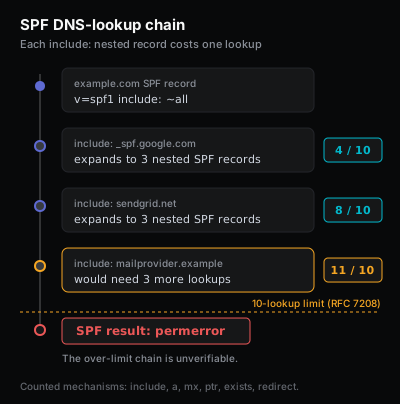
That record authorizes Google Workspace and SendGrid as the only valid outbound senders for the domain, and -all tells receivers to treat anything else as unauthorized. Each include: triggers a DNS lookup that fetches the included provider's SPF record. SPF evaluation is capped at 10 DNS lookups in total. Crossing that limit returns a permerror, which receivers typically treat as a non-pass result. Multiple SPF TXT records on the same name also break evaluation because receivers expect exactly one.
Beyond the include: mechanism, SPF supports several other ways to authorize senders. The ip4: and ip6: mechanisms hardcode specific addresses or ranges and are common for self-hosted mail servers or fixed VPN egress IPs. The a mechanism authorizes any host whose A record matches the connecting IP, and mx authorizes any host listed in the domain's MX records. The exists: and ptr mechanisms are technically valid but rarely useful in modern setups, and ptr is explicitly deprecated by the SPF specification because of resolver performance concerns. Senders should generally prefer include: for provider-managed senders and ip4:/ip6: for fixed addresses, and avoid a/mx unless the domain runs mail on the same hosts it advertises in those records. The SPF record syntax reference covers every mechanism, qualifier, and modifier in full.
The most common SPF mistakes are subtle. A domain may have a syntactically valid record that omits the real outbound platform, so legitimate mail still fails authorization. Two teams may publish two separate SPF records, which invalidates both because receivers expect exactly one. The record may chain through too many include: references and silently hit the 10-lookup ceiling once a downstream provider expands their own SPF. A team may copy a record from a tutorial that uses ~all (softfail) without understanding that the policy is advisory only and provides weaker protection than -all (hardfail); ~all versus -all explains what each qualifier tells a receiver to do. MX records are not a substitute for SPF entries; MX tells the world where to deliver inbound mail (you can check a domain's MX records to see where its inbound mail is routed), while SPF describes who is allowed to send outbound. Confirming the published record, counting DNS lookups, and verifying that the real sending platforms appear in the resolved mechanism list belongs on every domain-health checklist. The SPF checker performs these checks against a domain on demand.
DKIM — sign messages so recipients can verify them
DKIM, defined in RFC 6376, is a cryptographic signature that the sending platform adds to outgoing messages, verifiable against a public key published in DNS. Where SPF authorizes a network address, DKIM authorizes the message itself. The sending server signs a chosen set of headers plus the message body using a private key and attaches the signature in a DKIM-Signature header. Receivers fetch the matching public key from <selector>._domainkey.<domain>, verify the signature, and conclude that the signed parts of the message were not altered in transit and were generated by a system that held the private key.
A working DKIM setup has three parts: a key pair generated by the sending platform, a public key published in DNS at a provider-chosen selector, and signing turned on inside the sending platform admin UI. The DNS-side record for a hypothetical selector s1 belonging to example.com looks like this:
Name:  s1._domainkey.example.com
Type:  TXT
Value: v=DKIM1; k=rsa;
       p=MIGfMA0GCSqGSIb3DQEBAQUAA4GNADCBiQKBgQDX...
The DKIM checker and DNS auth pillar are useful starting points if a selector lookup fails or the published key does not match what the sending platform expects.
The selector is arbitrary and chosen by the sending provider. Google Workspace typically uses google. SendGrid uses s1 and s2. Mailgun uses k1. Microsoft 365 uses selector1 and selector2. A domain that sends through several platforms will publish several DKIM keys, one per selector, and each platform must be configured to sign with its own key under the visible From domain. DKIM selectors and keys covers how selectors work, the per-provider conventions, and the three ways to find yours.
DKIM key strength and rotation are operational details worth understanding before a problem arrives. The current industry baseline is a 2048-bit RSA key; 1024-bit keys are still accepted by most receivers but are considered weak by current standards and are increasingly flagged in security audits. Selectors should rotate on a predictable schedule, typically once or twice a year, with the old selector left in DNS for several days after the new one is enabled so that mail signed under the old key still verifies during the rollover window. Providers handle this rotation automatically when DKIM is set up through their managed flow; self-hosted setups require a deliberate process to avoid signing-key drift across the rotation boundary.
DKIM failures fall into two broad categories. The DNS-side category includes a missing public key, a key published under the wrong name, a key copied with line breaks or stray quotes, or a stale key after a provider rotated selectors and removed the old one too aggressively. The message-side category includes signing turned off in the provider admin UI, a downstream security gateway that modifies headers or body content after signing, or a forwarding hop that rewrites the message in a way that breaks the body hash. A DKIM DNS record can look perfect in a lookup tool while real messages still send unsigned, so a complete DKIM check needs both the DNS key and a real Gmail or Outlook header from a recent test message. The DKIM checker inspects the DNS side, and the original message headers from a delivered test reveal the signing side.
DMARC — align SPF and DKIM with the visible From domain
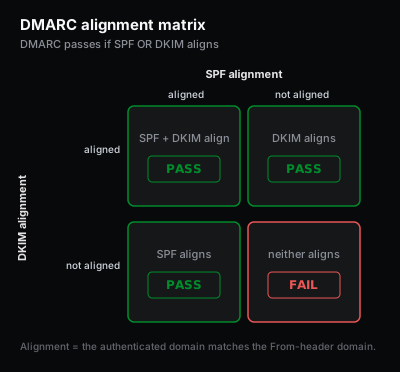
DMARC, defined in RFC 7489, is a DNS policy that tells receivers what to do when SPF or DKIM does not align with the visible From domain. Alignment is the part most operators miss. SPF can pass for a return-path domain owned by an email service provider, and DKIM can pass for a signing domain controlled by that same provider, while the visible From header still shows the operator's own domain. DMARC asks whether at least one authenticated identity matches the From domain closely enough to count as the same organization. If neither aligns, DMARC fails even though SPF and DKIM individually passed.
The DMARC record itself is a TXT record at _dmarc.<domain> that combines the enforcement policy, optional alignment modes, and optional report destinations:
Name:  _dmarc.example.com
Type:  TXT
Value: v=DMARC1;
       p=none;
       rua=mailto:reports@example.com;
       adkim=r;
       aspf=r
The p= value is the enforcement policy: none (monitor only, no action requested), quarantine (treat failing mail as suspicious, usually routed to spam), or reject (refuse failing mail outright at the SMTP layer). The rua= value receives aggregate reports, which are daily XML summaries that show which sources are passing and failing across all receivers that support DMARC. The adkim and aspf modes control whether alignment is strict (exact domain match) or relaxed (organizational domain match). Most operators start with relaxed alignment for both because strict mode rejects perfectly reasonable subdomain configurations. DMARC policy modes covers p=none, p=quarantine, and p=reject in full, and DMARC alignment covers relaxed versus strict and the adkim/aspf tags.
Two further tags deserve attention during rollout. The sp= tag controls the policy applied to subdomains separately from the organizational domain, which matters when a marketing team sends from mail.example.com while transactional mail leaves from example.com itself; without an explicit sp= value, the subdomain inherits the organizational policy. The pct= tag applies the policy to a percentage of failing mail rather than all of it, which gives operators a soft-launch dial between p=none and p=quarantine or between p=quarantine and p=reject. Setting pct=10 at p=quarantine quarantines roughly ten percent of failing mail and treats the rest as if the policy were p=none, which surfaces real-world breakage at low volume before full enforcement. Note that pct= is deprecated in the DMARCbis revision; DMARC policy modes covers the current guidance and what replaces it.
The standard DMARC rollout progresses through three phases. Begin at p=none with reporting enabled and read aggregate reports for several weeks to identify every legitimate sending source, including platforms forgotten or owned by other teams. Confirm that each source either sends with an aligned domain or can be configured to do so by the responsible team. Move to p=quarantine once the inventory is clean, which routes unaligned mail to spam folders without rejecting outright. Watch reports for one or two weeks for unexpected breakage from holiday campaigns or vendor mail. Finally move to p=reject once quarantine has run cleanly for the full reporting window. Jumping directly from no policy to p=reject because a checklist demanded it is how legitimate transactional, newsletter, or vendor mail starts disappearing without warning to recipients or the sending team. The DMARC checker inspects the published policy, the alignment modes, and the report destinations for a domain.
PTR and reverse DNS — prove the sending IP is who it claims to be
PTR records, sometimes called reverse DNS, map a sending IP address back to a hostname. A forward DNS query asks "what is the address of mail.example.com?" and gets an IP in return. A PTR query asks "what is the hostname for IP 203.0.113.10?" and gets a hostname in return. Mailbox providers and large receivers use the PTR result as a sanity check on the sending infrastructure: the hostname should resolve, it should belong to the operator of the sending system, and it should match the HELO/EHLO greeting the sending server announces during the SMTP handshake. A missing PTR, a generic ISP-default hostname, or a PTR that does not match HELO is one of the older but still active reasons a self-hosted mail server gets distrusted or filtered into spam regardless of how clean the SPF/DKIM/DMARC stack looks.
PTR is controlled by the network operator that owns the IP address, not by the domain owner's DNS host. Senders using Google Workspace, Microsoft 365, SendGrid, Mailgun, Postmark, or any other established email service inherit a managed PTR from that provider and do not need to configure one themselves. Senders running their own outbound mail server on a VPS or dedicated IP must request a PTR from the hosting provider, typically through a control panel, a support ticket, or a network API call. To inspect the current PTR for an IP, run nslookup -x 203.0.113.10 on any workstation, or use the host-provider reverse-DNS management UI. Relaymetry does not publish a dedicated PTR-lookup tool at this time; the diagnostic for this signal lives at the operating-system command line or with the network operator that controls the address space.
Common failure scenarios
The same authentication failures show up in many surface forms. Each scenario below has its own targeted diagnostic and fix path:
- SPF record exceeds the 10 DNS lookup limit
- Two SPF records published by mistake
- PTR record missing on a self-hosted outbound server
- SPF broke after adding a new sending platform
- DKIM record published but messages arrive unsigned
- DKIM passes but DMARC fails on alignment
- DMARC fails on SPF because the return-path is misaligned
- DMARC policy too strict for a legitimate third-party sender
- Reverse DNS does not match the HELO greeting
How to test your domain
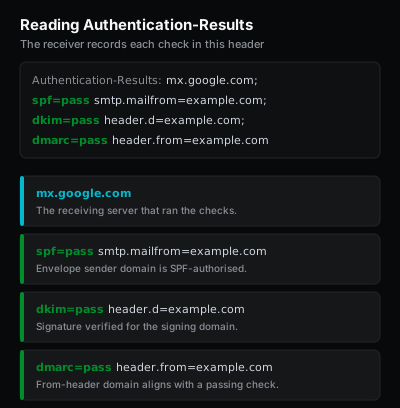
Test a domain against the four signals before assuming a deliverability issue is reputation-driven. SPF should be one TXT record listing every real outbound platform under the 10-lookup limit. DKIM should publish a public key under at least one selector for every platform that sends as the domain, and real messages from each platform should arrive at Gmail or Outlook with dkim=pass in the headers. DMARC should have a policy in DNS and at least an aggregate report destination so the responsible team can see who is sending under the domain. PTR should resolve to a hostname controlled by the network operator running the outbound IP, and that hostname should match the HELO/EHLO greeting. Run the SPF, DKIM, and DMARC checks above against the production domain, send a test message into a personal Gmail or Outlook account, and inspect the original message headers for the line that reads Authentication-Results:. Three pass results next to SPF, DKIM, and DMARC, plus a coherent PTR, clears the public technical baseline. Anything that still fails after that point is a reputation, content, or engagement problem rather than a DNS one, and why are my emails going to spam walks those non-DNS causes in priority order.