Quick answer
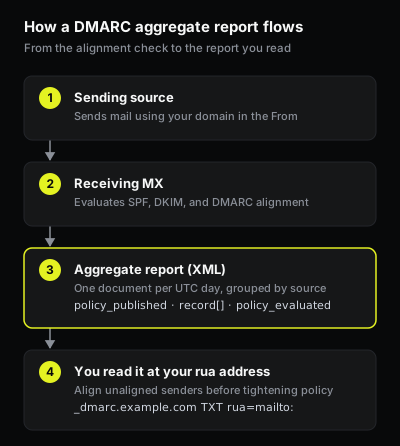
A DMARC aggregate report, also called a RUA report, is the daily XML feedback a receiving mail provider sends about messages it saw using your domain in the visible From. You request it with the rua tag in your DMARC record. Each report lists every sending source it observed, the message counts, and how SPF, DKIM, and DMARC alignment evaluated. You read it source by source to find legitimate senders that are not yet aligned, and fix them before you tighten policy.
What a DMARC aggregate report is
A DMARC aggregate report is a statistical, machine-readable summary defined in RFC 7489 §7.2. A receiver that supports DMARC reporting generates one report per reporting period (almost always a single UTC day) for each domain it saw mail from, and sends it to the address in that domain's rua tag.
The report is aggregate, not per-message. It carries counts and verdicts grouped by sending source, never the content of any message. That makes it the channel you use to understand who sends mail as your domain and whether each source authenticates, without exposing message bodies.
This is the data behind the standard DMARC rollout. A p=none policy enforces nothing on its own; its job is to turn on aggregate reporting so you can see your real sending picture before you ask receivers to quarantine or reject anything.
How you start receiving them
You request aggregate reports by adding a rua tag to your DMARC TXT record at _dmarc.<yourdomain>. The value is a URI, normally a mailto::
_dmarc.example.com. IN TXT "v=DMARC1; p=none; rua=mailto:dmarc@example.com"
The rua tag accepts a comma-separated list of URIs, so you can send the same reports to more than one destination. Per RFC 7489 §6.3, rua is the address for aggregate feedback and ruf is the separate address for forensic (failure) reports.
There is one cross-domain rule worth getting right. If the rua address is at a different domain than the one you are protecting, the receiving domain has to opt in, or receivers will refuse to send there. RFC 7489 §7.1 requires an external-destination authorization record published as a TXT record at <protecteddomain>._report._dmarc.<reportingdomain> with the value v=DMARC1. If you point rua at a third-party reporting service, that service's domain needs this record for your domain. When the rua address is at your own protected domain, no such record is needed. A page on a missing DMARC record covers publishing the record in the first place.
What the XML contains
An aggregate report is XML. The top is a <report_metadata> block with the reporting organization (org_name), an email contact, a unique report_id, and a <date_range> with begin and end timestamps. A <policy_published> block follows, echoing the policy the receiver read from your record: the domain, p (and sp for subdomains), the alignment modes adkim and aspf, and pct.
The body of the report is a series of <record> elements, one per sending source. Each <record> has:
- A
<row>with the<source_ip>that sent the mail, the<count>of messages from that source in the period, and a<policy_evaluated>block.<policy_evaluated>holds the<disposition>the receiver applied (none,quarantine, orreject) and the DMARC-relevant<dkim>and<spf>results. These are the aligned results, the verdict DMARC actually uses. - An
<identifiers>block with<header_from>, the domain in the visible From that DMARC checks alignment against. - An
<auth_results>block with the raw SPF and DKIM outcomes. This is where the distinction matters: a source can show<auth_results>SPFpassfor one domain yet have<spf>under<policy_evaluated>come outfail, because the SPF passed for an envelope domain that does not align with the From. The raw result and the aligned result are different fields, and DMARC keys off the aligned one.
How to read it
Read a report source by source. For each <record>, take the <source_ip> and <count>, then look at <policy_evaluated>. The two fields that decide the DMARC verdict are the aligned <dkim> and aligned <spf>. A source passes DMARC when at least one of them is pass and aligned with the <header_from> domain, per the identifier-alignment rules in RFC 7489 §3.1.
The sources that need attention are the ones that are your own mail but show both aligned results failing. A small worked example:
source_ip   192.0.2.10    count 1842   dkim=pass  spf=pass   -> your aligned ESP, fine
source_ip   203.0.113.77  count 318    dkim=fail  spf=fail   -> a real sender, not aligned yet
source_ip   198.51.100.9  count 27     dkim=fail  spf=fail   -> unfamiliar source, investigate
The middle row is the typical find: a service you recognize, sending real mail, that has not been set up to authenticate under your domain. That is a sender to align. The bottom row is either another forgotten integration or unauthorized use, which is what DMARC eventually blocks.
You can paste a real report into the DMARC report analyzer to see the per-source aligned results in a table, and check that your record actually carries a rua with the DMARC checker.
Reading reports to advance policy safely
Aggregate reports exist so you can move policy without blocking your own mail. The order is: stay at p=none, let reports accumulate for a few weeks, and resolve every legitimate source that shows failing alignment by setting it up to pass SPF or DKIM under your domain. Once the reports show your real senders consistently aligned, you have the evidence to advance. The guide to moving DMARC from p=none to p=reject walks through that progression and the quarantine step in between. The reports are the prerequisite for it: they are how you confirm, before each step, that tightening will not catch mail you actually wanted delivered.
Aggregate (rua) vs forensic (ruf)
Aggregate (rua) and forensic (ruf) reports are two different channels. Aggregate reports are the daily statistical summaries described above: counts and alignment verdicts grouped by source, with no message content. Forensic reports are per-message samples of individual failures, and they can include header-level detail, which is why few receivers send them and why they carry privacy considerations. For monitoring and for planning a policy change, aggregate reports are the ones that matter. Forensic reports, where available, are a supplementary debugging signal, not the basis for policy work.
What aggregate reports do not tell you
Aggregate reports have real limits. They never contain message bodies, so they cannot tell you what a message said. They are sampled and delayed: a report covers a full UTC day and arrives hours after that day closes, and the pct tag means a policy can apply to only a sampled fraction of mail. They also depend on the receiving side. Not every provider supports DMARC reporting, so a quiet source in your reports is not proof that the source sends no mail. It may simply be reaching receivers that do not report. A clean aggregate picture confirms that reporting receivers saw your senders aligning; it is the evidence you read before tightening policy, not a delivery guarantee.