Quick answer
Outlook sends your mail to the Junk folder — or blocks it outright — when the message fails one of Microsoft's authentication checks, when the sending IP or domain carries weak reputation, or when content filtering scores the message as risky. Microsoft's mail surfaces run the same baseline checks: SPF authorization, DKIM signatures, DMARC alignment, and reverse DNS on the connecting IP. A failure on any of those produces a Non-Delivery Report with a specific 5.7.x code that names the cause. If authentication passes and the mail is still quarantined or rejected, the problem has moved to reputation or content scoring, which Microsoft evaluates with signals that no public DNS lookup can reveal.
What "Outlook" means today
"Outlook" is not a single mail system, and a deliverability problem behaves differently depending on which Microsoft surface the recipient uses. Three surfaces matter, and they share filtering technology but not configuration.
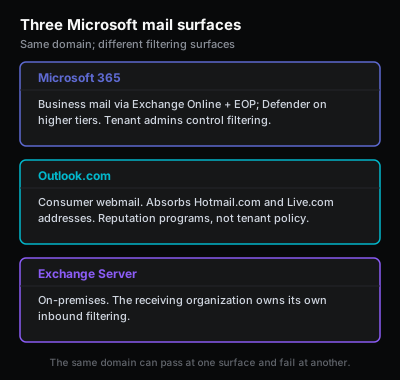
Microsoft 365 is the business mail platform, formerly branded Office 365. Mail for a Microsoft 365 tenant routes through Exchange Online and is filtered by Exchange Online Protection before it reaches a mailbox. Tenants with the higher licensing tiers also run Microsoft Defender for Office 365 on top of that baseline. Filtering decisions here are partly controlled by the receiving tenant's own administrators, who can publish allow and block entries, anti-spam policies, and connection filters that override Microsoft's defaults.
Outlook.com is the consumer surface. It is the free webmail service that today also absorbs Hotmail.com and Live.com addresses. Hotmail was retired as a brand years ago, but the addresses still exist, and mail to a @hotmail.com recipient now follows the same Outlook.com routing and filtering path. Consumer filtering is not configurable by the sender, and the levers available are reputation programs rather than tenant policy.
Exchange Server is the on-premises product. An organization that runs its own Exchange Server controls its own inbound filtering, often pairing Exchange with a third-party gateway or with Exchange Online Protection in a hybrid configuration. When mail to an on-prem Exchange domain fails, the receiving organization's administrators own the filtering decision, not Microsoft.
The practical consequence is that the same domain can deliver cleanly to one Microsoft surface and fail at another. A message accepted by a permissive on-prem Exchange Server may be quarantined by a strict Microsoft 365 tenant, and consumer Outlook.com may filter mail that a business tenant accepts because the consumer side weighs IP reputation more heavily for unknown senders. Identify which surface is rejecting before changing anything, because the fix path and the available diagnostics differ.
The four authentication signals Outlook checks
Microsoft's mail surfaces evaluate the same canonical authentication baseline that other large mailbox providers use. The four signals are SPF, DKIM, DMARC, and PTR. Each is described in depth in the email authentication guide; the summary below covers what Outlook specifically does with each result.
SPF is a DNS TXT record that authorizes which servers can send mail using the domain's envelope sender identity. Exchange Online Protection looks up the SPF record of the envelope sender domain and checks whether the connecting IP is authorized. An SPF hardfail on a domain that publishes -all is a strong negative signal and frequently produces an outright rejection rather than spam-folder placement.
DKIM is a cryptographic signature added to outgoing messages and verified against a public key published in DNS. Outlook checks the signature to confirm the signed headers and body were not altered in transit. A domain can publish a valid DKIM key in DNS yet still send unsigned messages if signing is not enabled in the sending platform, so a passing DNS lookup does not prove that real messages carry a signature.
DMARC is a DNS policy that tells receivers what to do when neither SPF nor DKIM aligns with the visible From domain. Microsoft honors published DMARC policies. A message can pass SPF and pass DKIM and still fail DMARC when the authenticated domain belongs to an email service provider rather than the domain in the From header. Microsoft's handling of a DMARC p=reject policy has tightened over time, and a failure here now reliably produces a rejection rather than a quiet downgrade.
PTR is the reverse-DNS record that maps the connecting IP back to a hostname. Microsoft treats a missing PTR, a generic hosting-provider PTR, or a PTR that does not match the HELO/EHLO greeting as a reason to distrust a self-hosted sender. Senders on Microsoft 365, a managed ESP, or another established platform inherit a correct PTR from that provider. Senders running their own outbound mail server must request a PTR from the network operator that owns the IP.
These four signals are necessary but not sufficient. Clearing all four removes the obvious technical reasons for rejection. It does not guarantee inbox placement, because Microsoft also weighs IP and domain reputation and content scoring after the authentication gate.
The Outlook NDR taxonomy
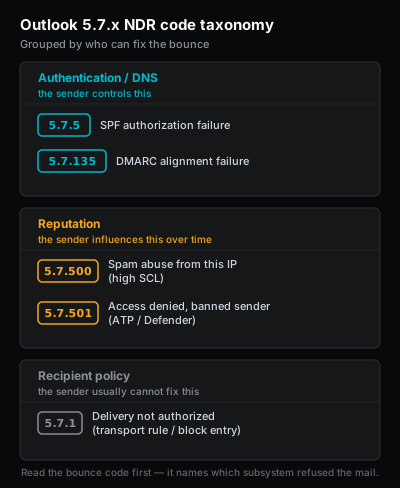
When Microsoft refuses a message, it returns a Non-Delivery Report, also called an NDR or bounce, carrying an enhanced status code in the 5.7.x range. The 5.7.x family means a security or policy rejection rather than a routing or mailbox error. The specific code is the most useful single piece of evidence in an Outlook delivery incident, because it names the subsystem that refused the message. Keep the full NDR text, not just a paraphrase, because the human-readable diagnostic line alongside the code often carries a remediation URL or a policy name. For example, a 5.7.134 or 5.7.12 names a mailbox or organization that only accepts internal senders, and a 5.7.510 names a recipient that refuses IPv6.
5.7.501 — Access denied, spam abuse detected (sending account banned)
This code means Microsoft detected spam abuse from the sending account and banned it. The diagnostic text is Access denied, spam abuse detected. It is associated with a sending identity — most often a compromised or misused account — that Microsoft has classified as a source of spam activity. Because the ban is reputation-driven and made on Microsoft's side, sender-side configuration changes alone rarely clear it. The path forward is to reset the affected account's credentials, remediate the underlying cause of the abuse, and contact Microsoft Support; when the ban is keyed to an IP range, use the delisting portal.
High SCL — routed to Junk, no specific NDR code
There is no dedicated 5.7.x NDR for a high Spam Confidence Level. When Exchange Online Protection scores a message or its source as spam with high confidence, it does not bounce the mail with a unique code — it routes the message to the Junk Email folder or quarantine. The closest documented code in this area is the transient 451 4.7.500-699 Access denied, please try again later, which signals throttling rather than a permanent spam verdict. The cause of a high SCL is usually IP or domain reputation: a shared IP with a poor neighborhood, a recent volume spike, a spike in complaints, or a list-quality problem. Authentication can be perfectly valid while the SCL is still high.
5.7.1 — Delivery not authorized, message refused
This is a policy rejection. The receiving system refused the message because of a rule rather than a reputation score. On a Microsoft 365 tenant or an on-prem Exchange Server, the cause is often a transport rule, a blocked-sender entry, a connection filter, or a tenant allow/block list entry maintained by the receiving organization's administrators. Because the rule lives on the recipient side, the sender frequently cannot fix this without contacting the receiving organization.
5.7.509 — Sending domain does not pass DMARC verification (policy of reject)
This code is returned when a message fails DMARC against a domain that publishes a p=reject policy. Its diagnostic text is Access denied, sending domain does not pass DMARC verification and has a DMARC policy of reject. SPF or DKIM may have passed for a provider-controlled domain, but neither aligned with the visible From domain, so DMARC failed and the published reject policy was applied. The fix is alignment: ensure that either SPF or DKIM authenticates the same organizational domain that appears in the From header. (Note: 5.7.13 or 135 is a different code — Sender was not authenticated for public folder — a recipient-side public-folder restriction, not DMARC.)
5.7.23 — Sender Policy Framework violation (SPF failure)
This code names an SPF failure directly; its diagnostic text is The message was rejected because of Sender Policy Framework violation. The connecting IP was not on the authorized list in the envelope sender domain's SPF record, and the domain publishes a hardfail policy. Common causes are an SPF record that omits the real outbound platform, an SPF record that has crossed the 10-DNS-lookup limit and now returns permerror, or two separate SPF records published on the same name, which invalidates both. Confirm the published record and verify that every real sending platform appears in the resolved mechanism list. (Note: 5.7.5 is a different code — Remote certificate failed MTA-STS validation, a destination certificate / MTA-STS problem — not SPF.)
A practical rule: codes 5.7.509 and 5.7.23 point at authentication and DNS, which the sender controls directly. A high SCL (Junk placement, no specific NDR) and code 5.7.501 point at reputation, which the sender influences but does not control on a short timescale. Code 5.7.1 points at recipient-side policy, which the sender usually cannot change at all. Reading the code first tells you which of those three categories the incident belongs to before any record is edited.
ATP / Microsoft Defender for Office 365
Microsoft Defender for Office 365, still widely called ATP for the older "Advanced Threat Protection" name, is the layer that sits above Exchange Online Protection on tenants with higher licensing. Exchange Online Protection handles the baseline anti-spam and anti-malware work for every Microsoft 365 tenant. Defender adds threat-focused features: Safe Links rewriting, Safe Attachments detonation in a sandbox, anti-phishing models that look at impersonation and spoofing, and a continuously updated reputation model for sending infrastructure.
The reason Defender matters to a sender is that its rejections are the hardest to fix from the outside. When Defender refuses a message, the decision rests on Microsoft's classification of the sending IP or domain as a threat source. That classification is not something a sender can edit in DNS. SPF, DKIM, and DMARC can all pass while Defender still blocks the message, because Defender is asking a different question: not "is this message authenticated" but "is this infrastructure trustworthy." A Defender rejection does not carry a single fixed enhanced status code; the distinct spam-abuse ban code 5.7.501 comes from Exchange Online Protection's account-abuse enforcement, not from Defender's threat models.
The levers a sender does have are indirect. First, remediate the underlying cause: a compromised mailbox sending spam, a poorly maintained shared IP pool, a sudden cold-outreach campaign, or a malware-infected web property linked from the mail. Second, keep authentication clean, because Defender's models weigh authentication failures as additional negative signal. Third, use Microsoft's official sender support channels and the delisting and remediation portal rather than retrying the same mail. Repeated retries of mail that Defender is rejecting tend to reinforce the negative classification rather than clear it.
A receiving tenant's own administrators can also override Defender for a specific sender by adding a tenant allow entry. When a known business partner is blocked, the fastest resolution is often for the recipient organization to add that allow entry, because it does not depend on Microsoft re-evaluating a reputation score.
SCL — Spam Confidence Level
The Spam Confidence Level, or SCL, is the numeric score Exchange Online Protection assigns to inbound mail. The scale runs from -1 to 9. A value of -1 means the message was exempted from filtering, for example because it came from a safe sender or matched an allow rule. Values of 0 and 1 mean the message was scanned and judged non-spam. Higher values mean rising spam confidence, with the upper end of the range corresponding to mail that is treated as spam or as high-confidence spam and routed to the Junk Email folder or quarantine.
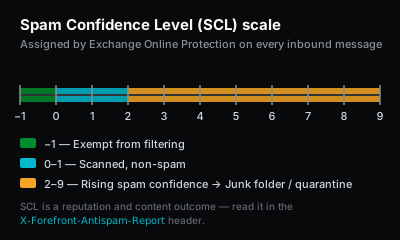
The SCL is recorded in the message headers, which makes it directly observable on any delivered message. Open the original headers of a message that landed in a Microsoft mailbox and find the X-Microsoft-Antispam header and the related X-Forefront-Antispam-Report header. The Forefront report contains an SCL: field with the numeric score, alongside other fields that explain the verdict: CAT: names the filtering category that fired, SFV: records the spam filtering verdict, and authentication results for SPF, DKIM, and DMARC appear as compauth and related fields. Reading these headers from a real delivered message is the most reliable way to learn how Exchange Online Protection actually scored a specific send, as opposed to how a DNS lookup suggests it should have scored.
A high SCL is a reputation and content outcome, not an authentication outcome. If headers show SPF, DKIM, and DMARC all passing but the SCL is high enough to route mail to Junk, the remaining problem is reputation, list quality, sending volume, or message content. Editing DNS records will not lower an SCL that is driven by those factors.
SNDS — Smart Network Data Services
Smart Network Data Services, or SNDS, is Microsoft's free program that gives the operator of an outbound IP address visibility into how Outlook.com sees that IP. It is the closest Microsoft equivalent to a postmaster dashboard for the consumer mail surface. SNDS reports per-IP data: the volume of mail Microsoft received from the IP, a sample complaint rate, trap-hit activity, and a color-coded filter result that summarizes whether mail from the IP is being accepted normally, filtered, or blocked.
SNDS is opt-in and is keyed to IP address, so it is most useful for senders who run their own outbound mail infrastructure or who control a dedicated IP at an ESP. Enrollment requires proving control of the IP range, typically by responding to a verification message sent to a role address in the range or by working through the network operator that owns the address space. Once enrolled, the data refreshes regularly and gives an early warning when an IP's reputation starts to degrade, before the degradation turns into widespread Junk-folder filtering or a hard block.
A sender who delivers entirely through a managed ESP on the ESP's shared IP pool generally cannot enroll the relevant IPs in SNDS, because the ESP owns and controls those addresses. For that sender, the ESP's own deliverability dashboard is the equivalent data source, and the ESP is responsible for monitoring SNDS on the shared pool.
JMRP — Junk Mail Reporting Program
The Junk Mail Reporting Program, or JMRP, is Microsoft's complaint feedback loop for Outlook.com. When an Outlook.com user marks a message as junk, a sender enrolled in JMRP receives a copy of that complaint at a designated address. This is the same category of feedback loop that other large mailbox providers offer, and it is the only way to learn which specific recipients on the consumer surface are complaining about a sender's mail.
JMRP is opt-in and, like SNDS, is keyed to the outbound IP address, so enrollment requires control of the sending IP range. The practical value of the feedback is list hygiene: when a complaint arrives through JMRP, the right response is to suppress that recipient immediately, because continuing to send to someone who has already marked the mail as junk drives complaint rate up and reputation down. A rising complaint rate is one of the inputs that pushes SCL higher and eventually produces filtering or rejection.
As with SNDS, a sender who delivers through a managed ESP on shared IPs usually relies on the ESP's own feedback-loop processing rather than enrolling directly. The ESP receives JMRP complaints for its shared pool and is expected to act on them, often by automatically suppressing complaining recipients across the sending account.
What to check first
When Outlook rejects or filters a domain's mail, work the evidence in order rather than editing every record at once. Editing several records simultaneously makes the incident harder to understand and can introduce new failures while the original one is still unproven.
Start with the bounce. If the send produced an NDR, read the 5.7.x code. The code is the single best indicator of which subsystem refused the message. A 5.7.23 or 5.7.509 code points at authentication and DNS, which the sender controls. A 5.7.501 code points at reputation, which the sender influences over time but cannot edit. A 5.7.1 code points at recipient-side policy, which usually requires contacting the receiving organization. If there is no bounce because the mail was accepted and then filtered into Junk — the usual outcome of a high SCL, which has no dedicated NDR code — the evidence shifts to the message headers instead.
Move next to the authentication check. Confirm the public records: SPF should be a single TXT record listing every real outbound platform under the 10-lookup limit, DKIM should publish a key under a selector for each sending platform, and DMARC should have a policy in DNS. Then inspect the headers of a real message delivered to an Outlook mailbox. The Authentication-Results and X-Forefront-Antispam-Report headers show how Microsoft actually evaluated SPF, DKIM, and DMARC for a specific message, which is the ground truth a DNS lookup only predicts.
If authentication is clean, move to the reputation check. Read the SCL from the headers of a delivered message. Check the sending IP against SNDS if the IP is self-managed and enrolled, or against the ESP's deliverability dashboard if mail goes through a managed platform. Check public blocklists for the sending IP and domain. Look for a recent change that could have shifted reputation: a new IP pool, an ESP migration, a volume spike, a cold-outreach campaign, or a list import.
If authentication and reputation both look clean and Outlook still filters the mail, the remaining factors are content and engagement. Review the message itself for risky links, mismatched display names, link-shortener domains, and attachment types that trigger Safe Attachments scanning. Confirm that the mail is going to recipients who expect it, because low engagement and high junk-marking on the consumer surface feed directly back into SCL and reputation. For the same causes seen across providers rather than just Outlook, why are my emails going to spam covers them in order.
This ordered narrative complements the interactive decision tree on this page. The decision tree walks through the same branches; this section explains why each branch comes where it does, so the reasoning is available even when the tree only shows the next step.